ArtCraft WordCraft and Google Wordcraft are different
The app covered here is linked from getartcraft.com/apps/wordcraft to storytold/wordcraft. It is a document editor written in Rust. Its official materials describe offline word processing and native DOCX read/write support.
The PAIR-code/wordcraft repository describes a Google research tool for AI-assisted short-story writing. That repository and its model setup are not ArtCraft WordCraft’s installer or evidence of this app’s AI features. A search result containing the same name is insufficient to identify either product.
Find the official WordCraft installer
Use ArtCraft Launcher or the official standalone release page. Our tested release is v0.5.0. Choose the graphical macOS disk image, the Windows installer for your processor or an appropriate Linux package. The CLI archive is intended for headless commands; the source archive is for building the app.
Match the operating system and CPU, keep the release notes and compare the package with SHA256SUMS.txt. Start with a copied document. A successful launch establishes installation only; file compatibility must be checked using the documents you actually need to deliver.
Use a small document with an obvious expected result
For a first trial, create a short heading, two paragraphs, one bold phrase and a two-by-two table. Choose text you own and a font available on both machines. Save a DOCX copy, close and reopen it, then export PDF. It is easier to spot missing content in this small file than in a long report.
Our fixture follows that pattern. The saved DOCX preserved all eight text runs in order, the Heading1 style reference, the bold phrase and one table. These checks compare document XML, not screenshots or a claim that every formatting setting is retained.
| Check | Result | What remains untested |
|---|---|---|
| Plain text and table text | All eight text runs retained | Fields, citations and tracked revisions |
| Heading and bold phrase | Style reference and bold run retained | Word pagination and font substitution |
| Table | One table retained | Complex borders, merged cells and nested tables |
| PDF export | pdftotext recovered all fixture text | Matching Word’s page layout or print output |
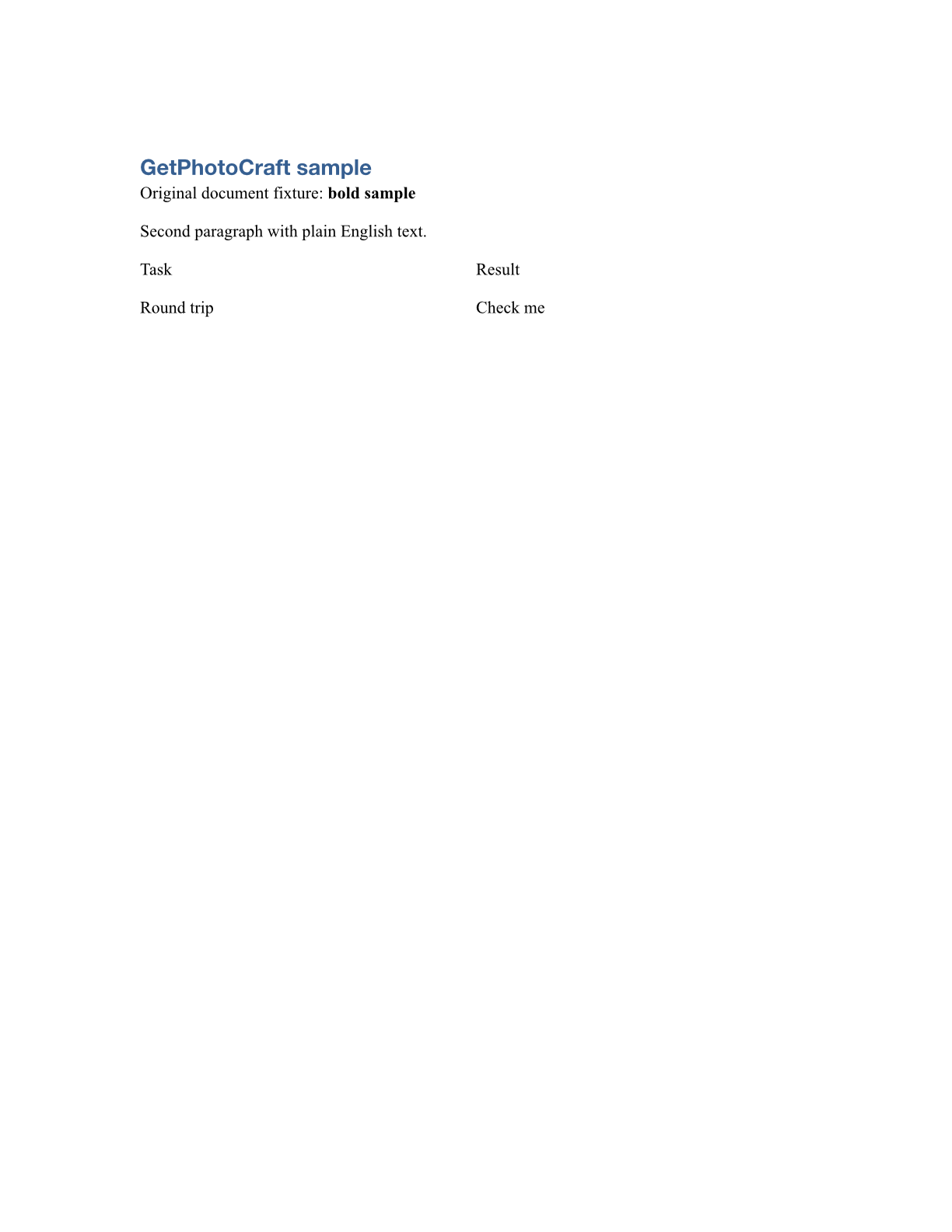
Repeat the headless file check
Download our original fixture into a fresh folder and use the matching CLI release. Inspect the input, save a new DOCX and make a PDF. Independently inspect word/document.xml inside each DOCX ZIP and extract the PDF text; a zero command exit code alone is not a compatibility result.
The CLI also rendered a page in our test. This establishes output for one file; it does not validate GUI editing, keyboard behavior or screen-reader support.
wordcraft-cli inspect fixture.docx
wordcraft-cli convert fixture.docx roundtrip.docx
wordcraft-cli convert fixture.docx rendered.pdf
wordcraft-cli render fixture.docx rendered.png --page 1
pdftotext rendered.pdf -
DOCX support is not universal Word compatibility
WordCraft’s README calls the app alpha and identifies complex document fidelity and pagination as continuing work. Charts, SmartArt and long or heavily formatted documents need their own round-trip tests. The presence of a ribbon command is not proof that it behaves identically to Microsoft Word.
We did not test Microsoft Word reopening, changes and comments, equations, images, macros, mail merge or long reports. For a shared business document, ask the receiving editor to inspect the saved copy. For designed spreads or a booklet, evaluate DesignCraft separately instead of expecting a word processor to cover a publishing workflow.
We also changed text formatting and inspected the saved document
In a follow-up editing case, the CLI selected “Second paragraph”, applied italic formatting and saved edited.docx. Independent OOXML inspection found the selected phrase in an italic run, all original document text retained and the table still present. This checks one actual formatting operation rather than conversion alone.
Formatting can split a paragraph into different XML runs, so the meaningful checks here are preserved document text and the intended formatting, not an identical run count. This edited copy is separate from roundtrip.docx, the unedited save used in the first check.
wordcraft-cli run --file fixture.docx --cmd 'select.text={"text":"Second paragraph"}' --cmd format.italic --save edited.docxCommon first-document questions
If the same text wraps differently on another machine, check fonts, page dimensions, margins and paragraph settings. Preserving the Heading1 style name does not establish identical font availability or pagination. Our test checked structure and PDF text, not Microsoft Word’s visual layout.
If the PDF can be read but text cannot be selected, test text extraction as a separate operation. Our exported PDF yielded all fixture text with pdftotext. That does not establish tags, reading order or accessibility for an arbitrary complex document.
When sharing an editable report, deliver the saved DOCX and ask the receiving editor to check the required features. When delivering a finished reading copy, inspect the PDF independently. Keep the source document so a later correction does not depend on rebuilding it from a PDF.
Sources & evidence
- Official ArtCraft WordCraft
- Official WordCraft v0.5.0 release
- WordCraft status and roadmap
- Google PAIR’s separate Wordcraft
- Our independent DOCX test
Checked October 12, 2026. Source pages, discussions and releases can change. GetPhotoCraft is independent of ArtCraft.